- DATE:
- AUTHOR:
- S&P Global
June 2024 S&P Capital IQ Release Notes
S&P Capital IQ Release Highlights
In this release, we integrated more than 19.4 million Government, Supranational, Agency and Corporates (GSAC) securities from Markit across all fixed income pages and improved reference data granularity. Portfolio Analytics now includes expanded closed-end mutual funds coverage with NAV, and enhanced scenario analysis. Credit Analytics features streamlined workflows and enhanced data sets for better responsiveness and robust company credit assessments, including the updated RiskGauge Report.
Visit S&P Capital IQ and Contact Us for additional details.
Fixed Income
In this release, we integrated over 19.4 million Government, Supranational, Agency and Corporates (GSAC) securities from Markit, more than doubling our coverage in Capital IQ.
Corporate, Supranational, Agency and Government bonds on S&P Capital IQ
Users can now access Government, Supranational, Agency and Corporates (GSAC) securities content in Capital IQ platform, integrated from Markit into all fixed income pages and functionality, including Fixed Income Summary, Securities Summary, Security Detail, Fixed Income Screening, Capital IQ Excel Plug-In, Search, Charting and Lists. In addition, we refined certain reference data to be more granular and descriptive. This includes nomenclature adjustments for fields like Bond type, Coupon Type, Coupon Interest Frequency, Green Bond Type, Ownership Type, and Default Type, as well as modifications to historical pricing for select securities. As these fields are integral to Screener and S&P Capital IQ Plug-in, users can experience changes in their result sets. Please note that as we update the database, you may notice differences between page views and Screener results.
Portfolio Analytics
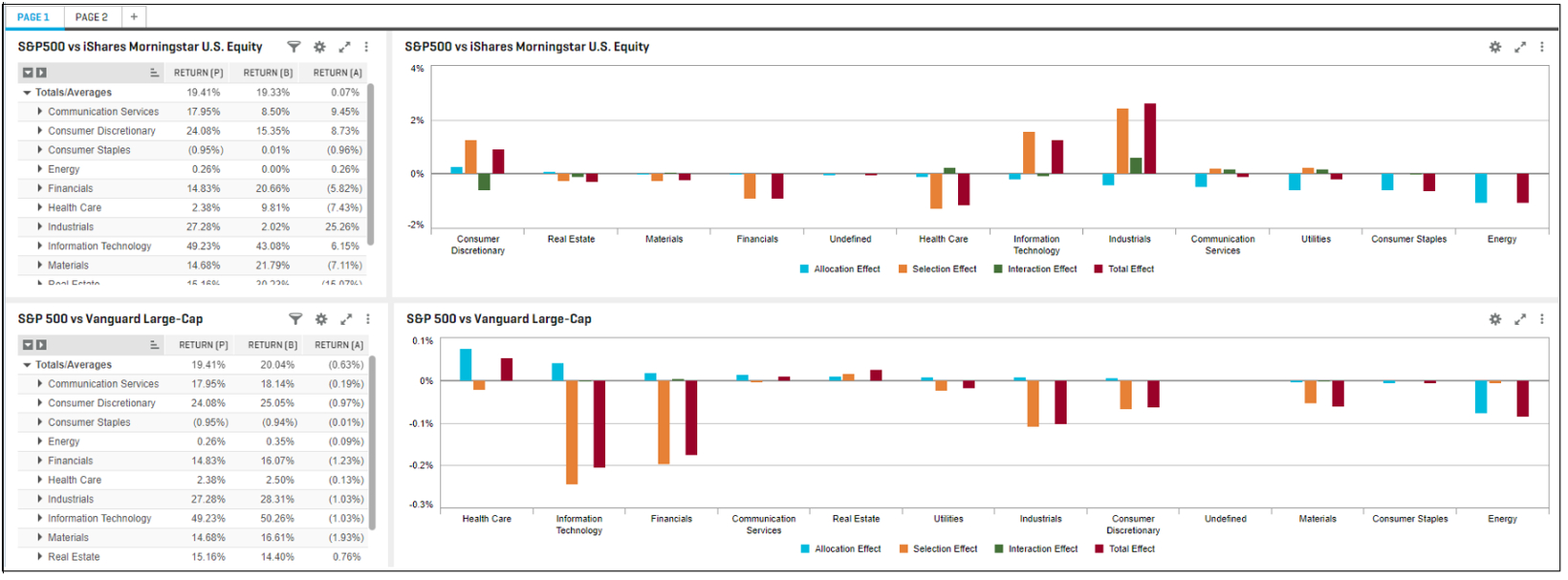
In this release, we expanded coverage for closed end mutual funds by offering Net Asset Value alongside day close price. We also expanded scenario analysis by including multiple portfolio and benchmark combinations within a single report for various 'What If' scenarios and made usability enhancements for portfolio creation and upload by providing a visual interactive guide in Portfolio Management section.
Net Asset Value for Closed-End Funds
Users can view extended coverage for closed-ended funds by using Net Asset Value (NAV) as pricing in their portfolios.
Find it in the platform:
Navigate to Portfolio Analytics report page and open an existing or create a new report
Add Net Asset Value by choosing closed-end funds as benchmarks, construct composites and a source fund in Share Allocator

Scenario Analysis
Users can conduct comprehensive comparisons with multiple portfolio and benchmark combinations, under different market conditions, in a single report. Portfolio Analytics enhances the depth of scenario analysis by testing against different indices, peer groups, exploring alternative asset allocation and attribution analysis.
Find it in the platform:
Navigate to Portfolio Analytics report page and create a new report
Add one or more widgets and add desired metrics to each widget
Navigate to Overrides tab in each widget, and select Portfolio/Benchmark section
Select desired combinations of portfolios and indices or custom benchmarks
Run the report and analyze the output


Portfolio Upload Tour from Portfolio Dashboard
Users can access a new in-platform tour to learn how to populate portfolios via file uploads, copy, paste or use an existing list, portfolio, index, or fund.
Find it in the platform:
Navigate to Portfolio Dashboard
Create a new portfolio and Save after providing essential metadata
Access the in-platform walk through tool which displays how to import holdings, transactions or portfolio returns from a file, copy and paste above contents from a file, add a holding or transaction on an individual basis
Or use Share Allocator tool to start with one or more existing universe and assign custom or one of the weighting schemes to populate new portfolio

Credit Analytics
In this release, we streamlined workflows and optimized processes to improve our responsiveness to recent events and provide more robust data sets. These enhancements span across the Credit Analytics and focus on company credit assessments like the RiskGauge Report.
VAT ID and Local Registry ID on the RiskGauge Report
On the RiskGauge Report, users can now easily identify the company by using the recent addition to the firmographics, the VAT ID and the Local Registry ID.
Find it in the platform:
Navigate to a company from the top search bar
In the left-hand navigation, select Credit Analytics > RiskGauge Report
On the RiskGauge Report, view the firmographic section to see the VAT ID and the Local Registry ID

Improved GSAC Bond Pricing in Credit Risk Pricing
Users can now experience a robust Government, Supranational, Agency and Corporates (GSAC) securities Bond Pricing workflow in Credit Risk Pricing. In addition to supporting regions like Asia Pacific, Eurozone, and North America, the downloadable Credit Risk Pricing report offers full results, enhancing information density. Moreover, the Tearsheet feature ensures increased clarity by distinguishing between curves sourced from the Corporate Yield Curves or GSAC Bond Pricing data.
Find it in the platform:
Navigate to Credit Risk Pricing from the top navigation or from the left-hand navigation of a company profile
Complete the scoring workflow and click on Credit Risk Pricing
From the Credit Risk Pricing page, select data source GSAC Bond Pricing Data and open the Country dropdown to find the regions Asia Pacific, Eurozone, and North America
Click Export to download the full Credit Risk Pricing Report
Select Upload Proprietary Data and navigate to the Credit Risk Pricing widget on the Tearsheet to view the data source of yield curves


Q1 2024 Economic & Country Risk Scenarios
Users can access Q1 2024 scenarios in the Macro Scenario Analysis tool. As a quarterly update, users now have access to the latest Economic & Country Risk (ECR) scenarios, including insert scenarios when available.
Find it in the platform:
Navigate to Macro Scenario Analysis from the top navigation or left-hand navigation of a company profile or through Score Company
Click ECR Historical Scenarios and select Baseline 03-2024 for latest scenarios applicable for period Q1-2024
Assign weights and click Generate Score to view forecasted 1 YR PD for the selected future year period
For each scenario, click View Full Term Structure to view the cumulative PDs over the entire term
Once scored, upload the scenarios, after which the weighted ECR scenarios are displayed in the Macro Scenario widget on both the Tearsheet and RiskGauge Report

S&P Capital IQ Plug-in
Since our last release, we have added this new model to meet your evolving data analysis needs.
Excel Template Library
Equity Listings
View security level detail for all equity securities for a company, including dividend history. This model is compatible with up to 11 different languages.